Closing the day should not mean chasing mismatched figures across multiple systems. End of Day – POS Reconciliation helps your team quickly compare TallOrder POS transactions with ResRequest folio postings, spot variances instantly, and close with greater accuracy and confidence.
https://resrequest.com/wp-content/uploads/2026/03/Blog-banner-1.gif4001140Dakotahhttps://resrequest.com/wp-content/uploads/2019/12/ResRequest_Logo_New.pngDakotah2026-03-27 11:06:292026-09-21 22:31:58End-of-Day Reconciliation: Close the day with confidence, not questions
Exceptional guest experiences rely on more than great service in the moment. They depend on clear communication behind the scenes, where requests are tracked, responsibilities are visible, and teams stay aligned across shifts and departments.
Join us as we celebrate storytelling, wildlife, and giving back with a safari-inspired read-aloud that brings Superheroes of the Savannah to life. Featuring a special reading by the author and illustrator, a dash of adventure, and a chance to win a copy of the book yourself – this is a story worth stopping the safari for.
https://resrequest.com/wp-content/uploads/2026/02/Blog-banner-8.png4001140Dakotahhttps://resrequest.com/wp-content/uploads/2019/12/ResRequest_Logo_New.pngDakotah2026-02-04 12:08:382026-02-09 10:02:47World Read Aloud Day | 4 February
As we close out 2025 and look ahead to 2026, we’re proud of a year filled with product releases, feature launches, and meaningful moments shared along the way. Beyond what we built, 2025 was about connection – meeting in person, visiting properties, attending events, and enjoying the conversations and collaborations that shaped the year. Behind it all, our ResQuesters worked tirelessly throughout the year, making space for both progress and the moments that made 2025 truly memorable.
ResRequest has joined the Constellation Software group through its Volaris division, aligning with Omegro, Adapt IT and Micros SA to scale our impact in specialist tourism. While we gain powerful backing and new opportunities, our customers can expect the same trusted team, tools, and service they’ve always known.
ResRequest has joined the Constellation Software group through its Volaris division, aligning with Omegro, Adapt IT and Micros SA to scale our impact in specialist tourism. While we gain powerful backing and new opportunities, our customers can expect the same trusted team, tools, and service they’ve always known.
https://resrequest.com/wp-content/uploads/2025/07/Blog-banner-team-movements-updates-4.png4001140Dakotahhttps://resrequest.com/wp-content/uploads/2019/12/ResRequest_Logo_New.pngDakotah2025-07-29 09:42:462025-08-25 14:42:35Same team. Same service. Backed by something bigger.
COVID-19 has certainly made most of us navigate this world with much fear and trepidation. From the paranoia of going to the grocery store to even the anxiety of leaving our homes out of fear of somehow being exposed to COVID. The tourism industry was undoubtedly hit the hardest with travel restrictions placed upon most / if not all countries across the globe. Since then we have seen a gradual lifting of those regulations and so responsible tourism has taken on an entirely new emphasis as we turn our attention to the most effective ways to enable our economies to recover from the fallout of the global Covid-19 pandemic.
To adjust to the “new normal”, the WTTC (World Travel and Tourism Council) together with health experts and other leading associations are working together to achieve effective recovery protocols by developing meaningful action plans that optimise sector-wide recovery efforts, according to the WTTC.
The WTTC aims to publish protocols in phases for the following industries including; Hospitality, Attractions, Outdoor Retail, Aviation, Airports, Short Term Rentals, Cruise, Tour Operators, Convention Centres, and MICE, Car Rental and Insurance. Each set of protocols takes into consideration the guidelines provided by the World Health Organisation and Centers for Disease Control and Prevention.
By implementing these action plans the WTTC aims to standardize safe travel by developing new global standards and a stamp that allows travellers to identify businesses and destinations that are adopting world-class health and strict hygiene protocols.
To obtain a Safe Travel stamp, countries and their destinations will have to share their protocols with the WTTC, who will then validate that they are in line with the WTTC guidelines.
By following these protocols companies are eligible for a safety stamp that you can display proudly on your website, thereby providing travellers with confidence that your destination has taken all steps to ensure they travel safely.
Who would have thought that at the beginning of this year our lives will look so different in a few short months? There is no doubt that COVID-19 has reshaped the way we work – especially in tourism. At ResRequest we noticed some trends amongst our clients with booking management during COVID, so we would like to share them with you! As we’re well aware, everyone manages their bookings differently, so we had our Support team on hand to customise this process, as the questions came in. Here are some of the FAQ’s we received:
“How can I use the Source Codes field to track COVID reservations, without affecting the reservation status?”
Source codes enable you to keep track of where your bookings are coming from. However, some customers have opted to keep track of COVID affected bookings using this field, as it can easily be reported on.
Our recommendation is to create 3 source codes:
COVID – Cancelled: Where bookings are cancelled outright.
COVID – Postponed: Where bookings are moved to a date in the future.
COVID – Pending: Where bookings are awaiting confirmation of date change or cancellation.
To set up, edit or deletesource codes navigate to Admin > Setup > Code tables > Other > Source > enter the Name and Abbreviation > Click save.
“I feel the need for an additional reservation status, to separate reservations held aside due to COVID postponements, from standard reservations”
Requests came in for a new reservation status, where bookings could be ‘held’ until the bookings were confirmed with new travel dates or cancelled by the agent or guest.
For this, we recommended using the ‘Waitlist’ status. This way you can report on actual confirmed stock for forward bookings and note stock still pending confirmation. By coupling this with a Covid status, teams can differentiate between bookings that are waitlist and those that are Covid-related ‘on hold’ bookings.
“How can I easily track COVID-affected reservations using reports?”
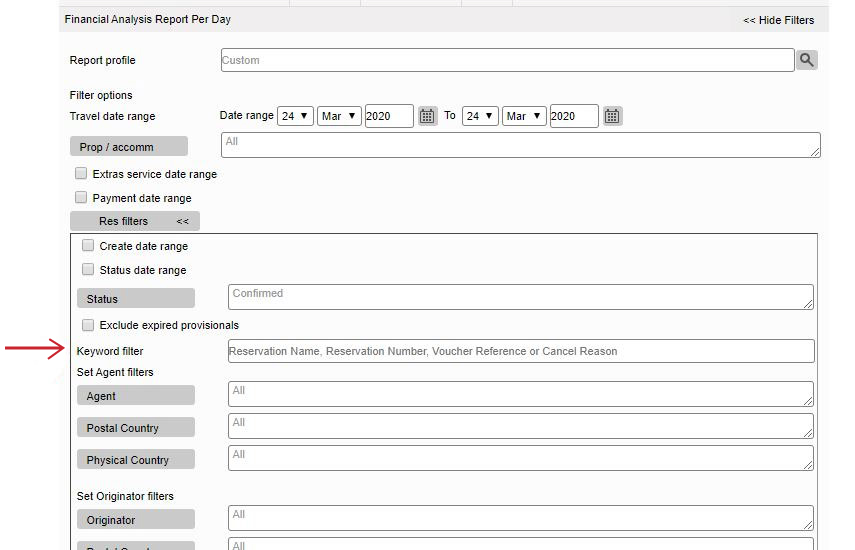
Our new ‘Keyword’ reporting filter is ideal to track booking movements around COVID.
On the Financial Analysis reports, the new field called ‘Keyword Filters’ can be found nestled with the rest of the Res Filters. This can be utilised to filter keywords found in the Reservation name, Reservation number, Voucher reference or Cancel Reason. ie. #coronavirus
Navigate to Reports > Financials > Financial analysis (day)
Here’s a practical example: You may opt to reference a keyword in the reservation name, for all reservations that are postponed to a later date due to COVID. In this instance, you’d include the same reference on all reservation names.
Should you, for example, choose to use “COVID” as your keyword/flag, a reservation name would appear as “Smith x2 COVID”. You’d then enter “COVID” in the Keyword filter field on the report, to view all bookings with “COVID” in the reservation name.
“What if I want to honour the rate the reservation was originally booked with, even if the reservation is postponed to next year?”
Some of our customers had already finalised their 2021 rates prior to COVID-19 hitting, which resulted in the 2021 rates being applied when allocating new travel dates to the postponed COVID reservations, instead of the 2020 rates. To honour the 2020 rate in 2021, you would need a “deferred rate”. Simply put, a deferred rate is a 2020 rate duplicated to ‘Deferred rate’ types for 2021.
Override rates are also an option to override rates for 2021, where rates had already been finalised for 2021, or rates had not been set up for 2021 yet.
“Are there other areas I should consider?”
Many hotels acted quickly, changing Payment plans, cancellation policies, and booking terms and conditions in Custom notes, to better handle and adapt quickly to the changing market.
“How can I see the impact COVID has had on my business?”
Some of our customers asked for a snapshot of what their stock looked like this time last year, to compare data between 2019 and 2020. This type of statistical data will give you invaluable insight into the true effects that COVID has had, and assist you to project your cash flow for when tourism reboots.ResInsite is a business intelligence tool which can generate comparison data, beautifully! Find out more about ResInsite and how it can benefit your business HERE. You will also be happy to know that all ResRequest customers have access to a FREE ResInsite Lite package, for the duration of 2020.
You will also be able to retrieve year on year comparisons in graph format, at the touch of a button! (Available in our new version release (V7.30). Have a look at our Sales Overview chart.
“I need to refund cancelled reservations. Where do I start?”
Issuing credits, credit notes, and refunds quickly became one of the most commonly talked about topics, with the questions streaming in!
It’s important that the way credits and refunds are done are in line with your specific financial processes. Contact our support team who will happily point you in the right direction.
“How can I keep track of both existing reservation dates, and potential future dates for the same booking, until travel dates are confirmed?”
A few of our customers opted to duplicate their reservations to hold stock for both present and future dates. This is in order to secure both sets of dates until they know when the guests can book flights.
Although this is being done by a few, it’s important to note that managing the reservations in this way will inflate your bed night revenue stats, as you’re basically doubling up.
“Is there a way I can keep an ‘archive’ of reservations cancelled due to COVID, but separate from actual cancelled reservations?”
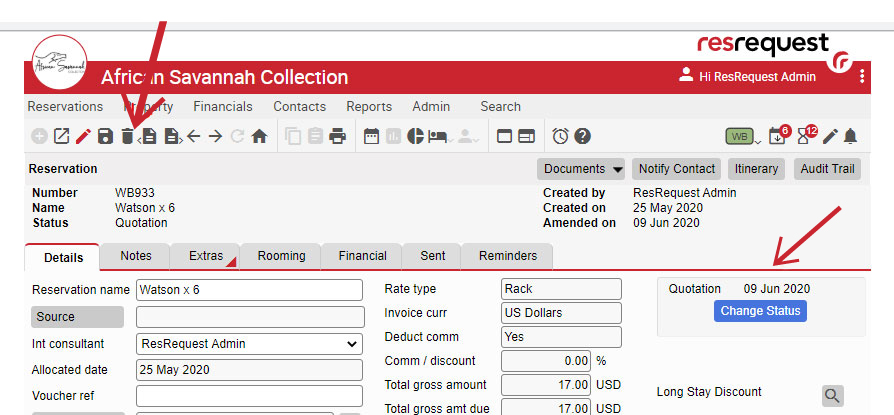
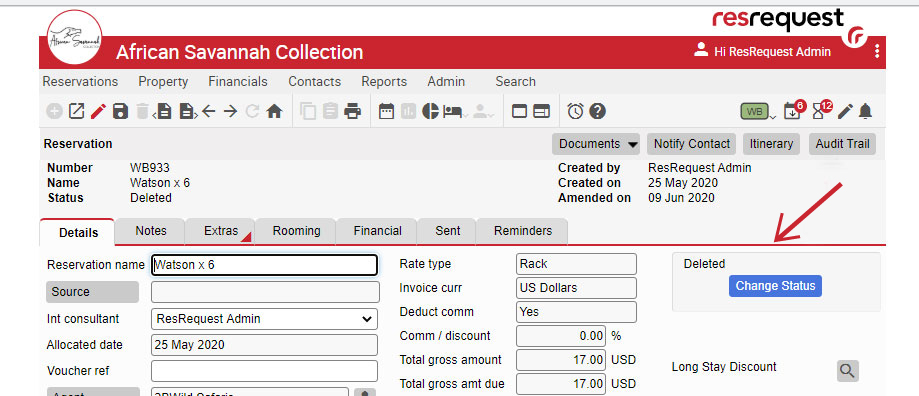
The ‘Delete’ status is not exactly an option to select under the status’ dropdown, but it is a status that can be used for reservations with no payments, and can also be reported on.
To achieve this navigate to the reservation > change the status of the reservation to ‘Quotation’ > and click the bin button to obtain the ‘Deleted’ status:
Why would you work this way? It’s another status option when trying to apply a “filing system” to manage your reservations affected by COVID.
Another common topic is – reports. We have listed a few report templates that could be insightful and of use, but it is almost guaranteed that they will need a few tweaks to suit your unique reporting requirements.
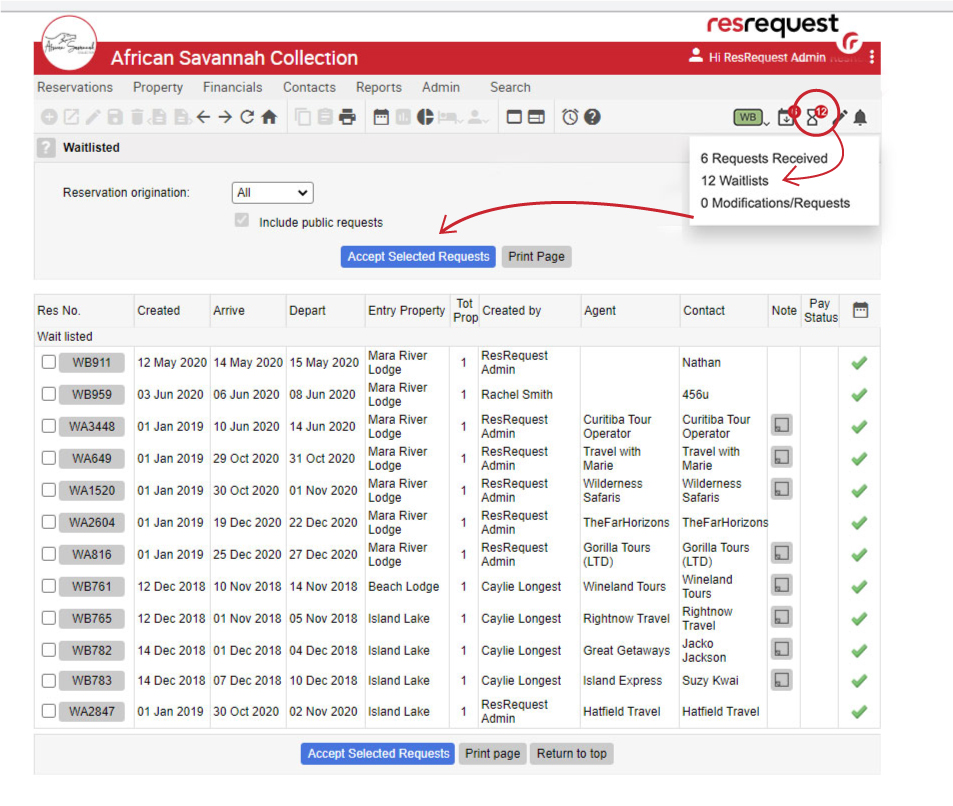
1. Waitlist reporting
This is a quick way to view the list of Waitlist bookings. Remember, you can also retrieve this info, and more, using your Financial Analysis, or Standard Reservation reports.
Navigate to the Waitlist icon > Select Waitlists >
2. Reservation status change report:
This report will display reservations where the status of the reservation was changed, over a particular date range. For example, you could use this report to see all reservations travelling in 2021, which had a status change between Jan and May 2020.
To generate this report in your system, you would follow these steps:
Navigate to Reports > Financials > Financial Analysis (day)
Select the Travel date range you wish to view
Res filters > Status date range – Select the status date range you wish to view and apply the date range.
Res filters > Status: Confirmed, cancelled and provisional
Select data > Group: add Res#, Source, status confirm date, status Provisional date, Status Cancellation date, cancellation reason
Select data > Fields: add arrival and departure date
Display options: Select Include group totals
3. Reservation travel date changed:
This report will display every reservation edited between April and May and will, furthermore, show if the arrival date changed between those dates:
1. Report Audit trail
2. Reports > Audit > Audit trail
3. Audit trail time: 1 April and 31 May
4. Action: Edited
5. Data options > Fields: Reservation number arrival date before and arrival date after
4. COVID Source code reservations
This report will show you all reservations with the “COVID” source code and what the arrival and departure dates for those reservations are:
Navigate to Reports> Financials > Financial Analysis (day)
1. Select the Travel date range: 1 Jan 2020 – 31 Dec 2022
2. Res filters > Status: All
3. Res filter > Source: e.g COVID 19
4. Select data > Group: add Reservation number, status, source code, and cancellation reason
5. Select data > Fields: add arrival date and departure date
6. Display options: Select Include period totals
5. Reservations with Payments/deposits
This report will display payments and the total amount outstanding on all reservations with a COVID source code:
Navigate to Reports> Financials > Financial Analysis (day)
1. Select the Travel date range: E.g. 1 April and 31 May
2. Res filters > Status: Select which status’ you would like to include
3. Res filters> Source: Select you source code you require e.g COVID-19
4. Select data > Group: Add Agent, Reservation#
5. Select data > Fields: Add Payment and Total amount outstanding
6. Display options: Select Include period totals
If you’d like some guidance, our support team will happily set up report profiles for you or walk you through setting them up yourself, over a call. Feel free to contact us with any queries you or your team might have. We are here and ready to assist.
https://resrequest.com/wp-content/uploads/2020/06/Covid-management-report.jpg4291030Jillhttps://resrequest.com/wp-content/uploads/2019/12/ResRequest_Logo_New.pngJill2020-06-24 12:57:502020-06-25 08:31:37FAQ: Managing Covid in ResRequest
Connecting to your key agents electronically will ensure you never miss out on valuable bookings. Tour operators use a host of software systems to stay on top of technology trends. Online bookings are one of the fastest growing trends.
ResRequest interfaces to a number of tour operating systems enabling, tour operators to book ResRequest properties when permission is granted. Recently we added to our channel partners and integrated to GranIT Safari.
GranIT Safari Software (GSS) is a specialist safari software product that manages tour operators’ business processes. The system has the ability to handle groups, F.I.T’s, packages, Fly-Drive packages and is currently being used by over 50 tour operators primarily in East Africa and Madagascar. It is available in English and French.
“With Safari Software we’ve reduced our response times to as little as 10 minutes.” Nilima Chandran – Naked Wilderness
Agents using GranIT Safari include Leopard Tours, Liberty Africa Safaris, African Horizons, Kobo Safaris, Utalii College and many more.
“It’s user-friendly, yet complex enough to deliver optimum options and endless possibilities.” Tomas Sorensen – African Horizons
GranIT Solutions’ partnership with ResRequest comprehensively links both the GSS and ResRequest software to be able to check room availability and book rooms in real time at the click of a button. Room availability can be checked at the quotation and tour levels. This ensures that the rooms booked on the itinerary are actually available.
“This software is the only one that does what we need without making us change our operating procedures to suit the software.” Richard Corcoran – Liberty Africa
https://resrequest.com/wp-content/uploads/2019/02/gran_IT-image2.png4001140Jillhttps://resrequest.com/wp-content/uploads/2019/12/ResRequest_Logo_New.pngJill2019-02-26 13:27:312020-04-24 13:14:42Are you connected to your buyers?
We may request cookies to be set on your device. We use cookies to let us know when you visit our websites, how you interact with us, to enrich your user experience, and to customize your relationship with our website.
Click on the different category headings to find out more. You can also change some of your preferences. Note that blocking some types of cookies may impact your experience on our websites and the services we are able to offer.
Essential Website Cookies
These cookies are strictly necessary to provide you with services available through our website and to use some of its features.
Because these cookies are strictly necessary to deliver the website, refusing them will have impact how our site functions. You always can block or delete cookies by changing your browser settings and force blocking all cookies on this website. But this will always prompt you to accept/refuse cookies when revisiting our site.
We fully respect if you want to refuse cookies but to avoid asking you again and again kindly allow us to store a cookie for that. You are free to opt out any time or opt in for other cookies to get a better experience. If you refuse cookies we will remove all set cookies in our domain.
We provide you with a list of stored cookies on your computer in our domain so you can check what we stored. Due to security reasons we are not able to show or modify cookies from other domains. You can check these in your browser security settings.
Other external services
We also use different external services like Google Webfonts, Google Maps, and external Video providers. Since these providers may collect personal data like your IP address we allow you to block them here. Please be aware that this might heavily reduce the functionality and appearance of our site. Changes will take effect once you reload the page.
Google Webfont Settings:
Google Map Settings:
Google reCaptcha Settings:
Vimeo and Youtube video embeds:
Privacy Policy
You can read about our cookies and privacy settings in detail on our Privacy Policy Page.